
Autoproxy lite - Get APK
You'll be able to download in few seconds.
Publisher Description
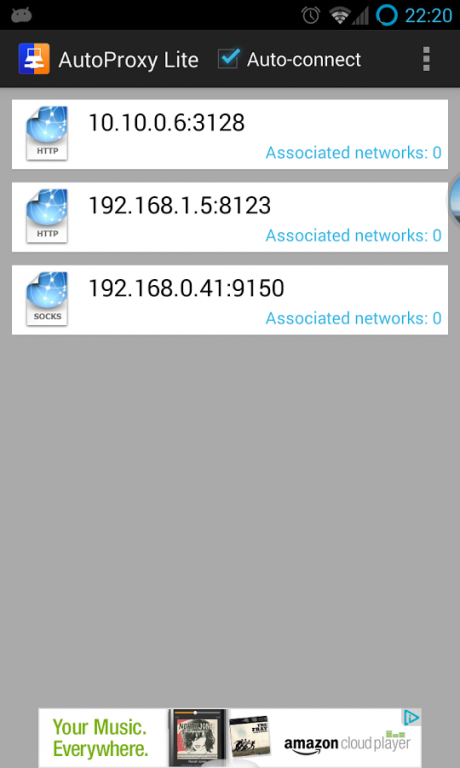
The most complete proxier on the Market. Autoproxy allows you to use Market, Gmail, maps or surf the web even behind the proxy from your home/school/office.
It works by creating a transparent/intercepting proxier running on your phone that redirects web traffic to your proxy. Other apps don't have to be aware there is a proxy!
All outgoing traffic is captured, formatted and transmitted through your network's proxy. That means it works with market, all browsers, gmail, maps, and others.
- Supports Http, https, socks4 and socks5 proxies. (Squid, forefront, polipo, tor, apache, privoxy, tinyproxy, etc)
- Limited support for proxy.pac files. It will connect to the proxy necessary to connect to Google.com.
- Basic, Digest, NTLM and NTLMv2 authentication supported
- Multiple proxy settings supported (as many as you need)
- Notifications when proxy is turned on
- Allows you to forward custom ports to proxy
- Allows you to specify destination hosts to be skipped, for use with connectbot or SSH tunnels
- Available in English, Portuguese, French, Italian, Spanish and German
Available on full version:
Purchase the full version to remove ads and support the developer
* ATTENTION *
Your phone must be rooted and have iptables installed for Autoproxy to work
About Autoproxy lite
The company that develops Autoproxy lite is Moroni Granja do Brasil. The latest version released by its developer is 1.0 .
To install Autoproxy lite on your Android device, just click the green Continue To App button above to start the installation process. The app is listed on our website since 2013-09-16 and was downloaded 0 times. We have already checked if the download link is safe, however for your own protection we recommend that you scan the downloaded app with your antivirus. Your antivirus may detect the Autoproxy lite as malware as malware if the download link to com.mgranja.autoproxy_lite is broken.
How to install Autoproxy lite on your Android device:
- Click on the Continue To App button on our website. This will redirect you to Google Play.
- Once the Autoproxy lite is shown in the Google Play listing of your Android device, you can start its download and installation. Tap on the Install button located below the search bar and to the right of the app icon.
- A pop-up window with the permissions required by Autoproxy lite will be shown. Click on Accept to continue the process.
- Autoproxy lite will be downloaded onto your device, displaying a progress. Once the download completes, the installation will start and you'll get a notification after the installation is finished.
Program Details
System requirements
Download information
Pricing
Version History
version
posted on 2013-09-16
Version 0.75 beta,- Several bugfixes,- Updated holo layout,- Option to check if proxy is at specified address before connection,- Expanded notification shows sent bytes through proxy (Android > 4.1),- option on notification to disconnect (Android > 4.1),- Lite version now auto-connects as well (no need to open app),- Logs now saved to sdcard (Android/data/com.mgranja.autoproxy_lite/cache)
version 0.61.1
posted on 2013-05-29
Several fixes and updates
Disclaimer
External Download
We do not host Autoproxy lite on our servers. We did not scan it for viruses, adware, spyware or other type of malware. This app is hosted by Galad and passed their terms and conditions to be listed there. We recommend caution when installing it.
The APK Download link for Autoproxy lite is provided to you by apps112.com without any warranties, representations or guarantees of any kind, so access it at your own risk.
If you have questions regarding this particular app contact the publisher directly. For questions about the functionalities of apps112.com contact us.
